





Hosts File: What is its purpose?
The “Hosts” file’s function is to tell your computer how to reach an IP address or a website’s domain name.

By default, it will instruct your browser to display the content of the requested website in the web navigation bar.
What is the purpose of modifying this file?
The “Hosts” file allows you to add an exception that ignores the default route by forcing your browser to go to another IP address.
This function is useful when you are developing a new site from an online domain name or when the site under development is hosted on another server and its IP address differs from the production site. By adding an exception, you will force your computer to follow the specified path as shown in the following table.
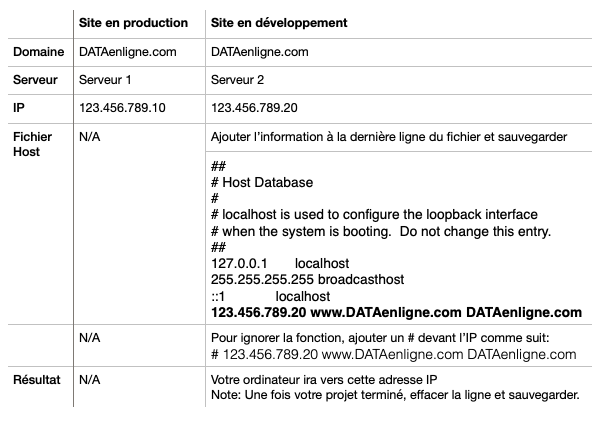
To modify your “Hosts” file, here are instructions you can follow for a computer running MacOS or Windows:
YouTube – Tutorial for MacOS (English only)
YouTube – Tutorial for Windows (English only)
For MacOS users, here are the commands to use in the Terminal application:
to access the “Hosts” file: sudo nano /etc/hosts
to clear the DNS Cache: sudo killall -HUP mDNSResponder
If you encounter difficulties, do not hesitate to contact us via the ticketing system, and we will assist you.